
감사로 드리는 헌금
교회에서의 헌금은 하나님께 드리는 예배의 한 형태이며, 하나님의 축복에 감사하는 마음을 표현하는 방법입니다. 여러분의 헌금은 교회의 사역을 지원하고, 복음을 전하며, 도움이 필요한 이웃을 돕는 데 사용됩니다. 여러분의 관대함을 통해 많은 사람들의 삶이 변화되고 그리스도의 사랑이 전해지고 있습니다. 항상 신실하게 헌신해 주셔서 감사드리며, 교회를 통한 하나님의 사역에 중요한 역할을 해주심에 깊이 감사드립니다. 여러분의 헌신은 큰 변화를 만들어냅니다!
Giving with Gratitude
Giving at church is an act of worship and a way to show gratitude for God’s blessings. It supports the church’s mission to serve the community, share the gospel, and provide for those in need. Through your generosity, lives are touched, and the love of Christ is shared. Thank you for your faithful giving and for being a vital part of God’s work in and through our church. Your support makes a difference!
01
우편으로 헌금하기
Give by Mail
준비하신 헌금은 예배 중 헌금 시간에 드리시거나, 주중에 교회로 우편 발송해 주십시오.
You may give your offering during worship or mail it to the church during the week.
수표의 수취인란에 KPCM을 기재해 주세요.
수표는 아래 주소로 우편 발송해 주십시오.
Checks are payable to KPCM.
Please mail checks to the address below.
Korean Presbyterian Church of Miami
9730 Stirling Road
Cooper City, FL 33024
02
온라인 헌금
Venmo & Zelle
Venmo 또는 Zelle로 헌금하실 수 있습니다. 보내실 때 메모란에 본인 성함을 적어 주세요. 수수료는 결제 수단과 서비스 이용 조건에 따라 달라질 수 있습니다.
You can give through Venmo or Zelle. Please include your name in the payment note or memo. Fees may vary depending on the payment method and service terms.

Venmo ID
kpcmonline

Zelle ID
finance@kpcmiami.org
Venmo로 헌금하는 방법
How to Give with Venmo
1
회원 가입
Set up Venmo
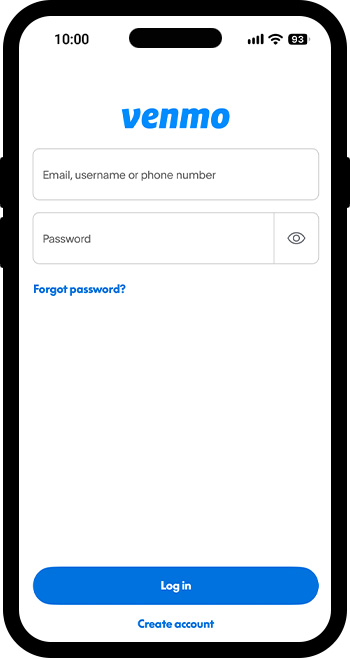
Venmo 앱을 다운로드하여
계정을 생성하거나 로그인해 주세요.
Download the Venmo app and create or sign into your account.
2
결제 수단 설정
Payment Settings
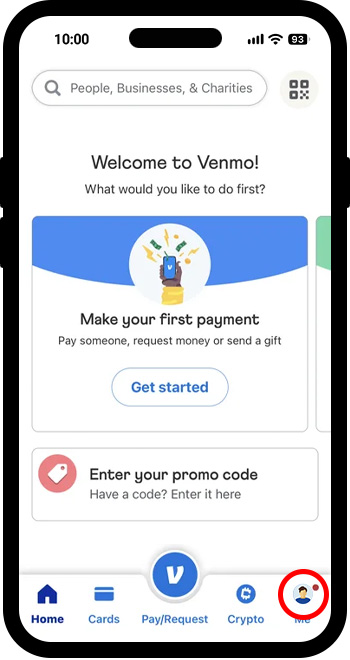
화면 오른쪽 하단의 Me 버튼을 눌러 주세요.
Tap the Me button at the bottom right of the screen.
3
설정 열기
Open Settings
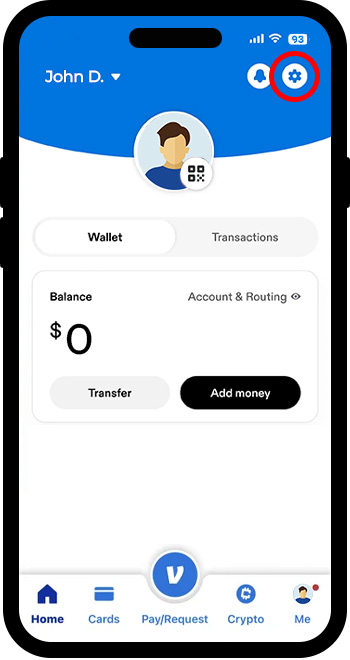
화면 오른쪽 상단의 톱니바퀴 버튼을 눌러 주세요.
Tap the Gear icon at the top right of the screen.
4
결제 수단 선택
Select Methods
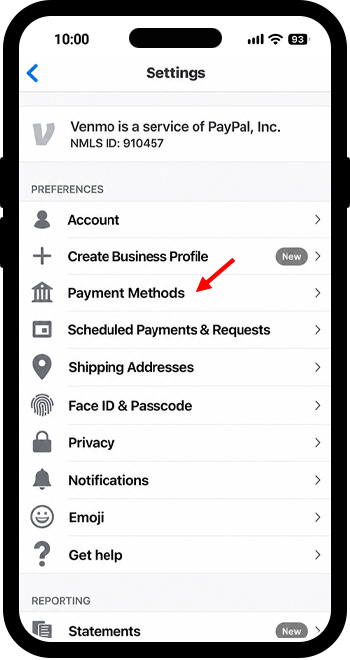
목록에서 Payment Methods를 선택해 주세요
Select Payment Methods from the list.
5
계좌 · 카드 연결
Link bank or card
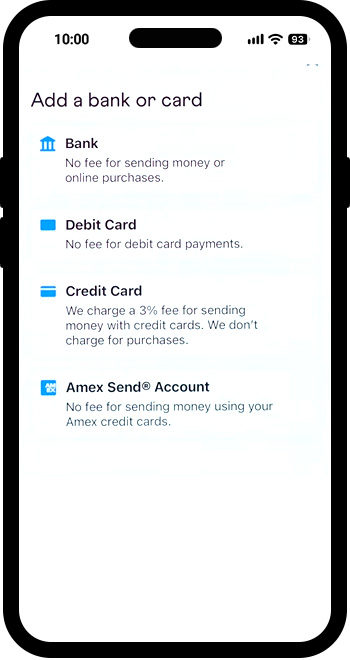
은행 계좌 또는 카드를 연결하고 화면의 안내에 따라 인증을 완료해 주세요.
Link your preferred method of payment and complete the verification process.
6
송금 시작
Start a payment
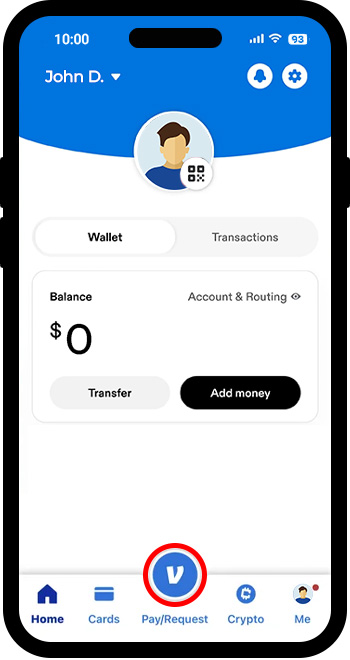
화면 하단의 Pay/Request를 눌러 주세요.
Tap Pay/Request at the bottom of the screen.
7
수신인 확인
Find KPCM
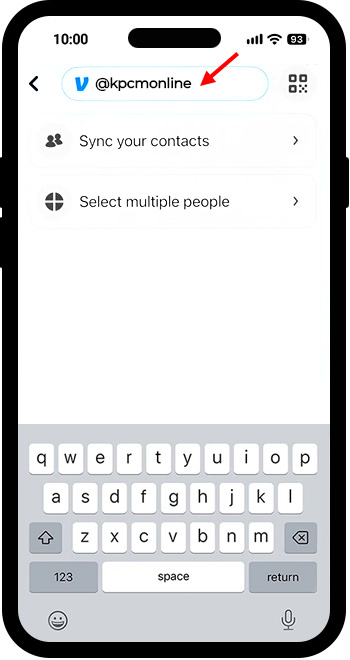
검색창에 kpcmonline을 입력하여 교회를 선택해 주세요.
Search for @kpcmonline and confirm the church’s account before selecting it.
8
확인 후 보내기
Review & Send
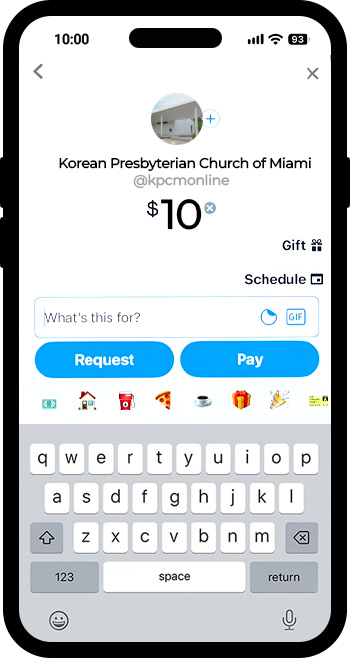
헌금 금액을 입력하고 메모란에 본인 성함을 적어 주세요. Pay를 누른 후 화면의 안내에 따라 수신인과 결제 수단을 확인하고 송금을 완료해 주세요.
Enter the amount and add your name in the note. Tap Pay, then follow the prompts to review the recipient and payment method and complete your payment.
화면은 이해를 돕기 위한 예시입니다. 실제 앱의 화면과 다를 수 있습니다.
Screens are illustrative; app appearance may vary.
신용카드 이용 시 수수료가 발생할 수 있습니다.
Credit-card-funded payments may incur fees.

Zelle로 헌금하기
Give with Zelle
1
은행 앱에서 Zelle 등록
Open your participating bank app and enroll with Zelle.
2
수신 이메일 입력 및 확인
Enter the recipient email finance@kpcmiami.org and confirm the recipient.
3
금액·메모 입력 후
확인 및 전송
Enter the amount, include your name in the memo if available, and review and send.